Sustainable Items Drag & Drop
An interactive game that explores how to make sustainable and eco-friendly swaps with
everyday household items.
The Project
The drag and drop game was created for a fictional client to showcase how learning can be done through an interactive game. Rather than reading a paragraph on sustainable swaps, this game allows the user to move items to and from a reusable bag and explore how to integrate these more sustainable items into their life. The fictional client in this project is a blogger specializing in sustainability, posting this game to their blog for readers to interact with. The client would serve as the subject matter expert as well and share fun facts with their audience with each action the user takes. A style guide and action map were created in Figma. The project was created in Articulate Storyline utilizing the drag and drop functionality. Item images were selected from the website Earth Hero with backgrounds removed, and Canva provided the kitchen background.
The Process
Style Guide
The style of this project used modern décor and minimal colors to allow the items to be more visible to the user. A green color (#9ABD51) was used for headings, bold text, and buttons to match the plants used in the introduction. Body text color throughout the game was black (#000000) and button text was white (#FFFFFF). No mentor button was used for this project due to its simplicity and all information being provided in information boxes that appeared when the user moved an item to a bag.

Action Mapping
An action map was created to identify the goal of the drag and drop game and to choose key items that should be included in the game. First was to consider what were the most common products used in a typical household. Then, I researched and found sustainable swaps that could be made for these common home products, such as toothpaste in aluminum packaging and jars in place of plastic containers. Using Figma, I made a central goal for the entire project, and then extended the the different house products from the center, with sustainable swaps listed next to each item. Details were added to provide reasoning for why certain household products were problematic and how these swaps can make an environmental impact.
Visual Storyboard
To help visualize what the final product of the game will look like, I created a visual storyboard using Figma and pulling the information collected from the action map. More design elements, including theme colors, item images, and backgrounds were provided to give the client the look and feel of the end project. Having the visual storyboard allows for collaboration between the client, subject matter experts, and myself to make adjustments to the course design before diving into more complex elements are added, such as object triggers.


Prototype
After the visual storyboard and outline for the course was approved by the client, I moved the course layout from Figma to Articulate Storyline 360 to develop an interactive prototype. The prototype includes only one scene with an introductory slide, one base layer for the user to drag and drop items into the reusable bag, and a final exit slide. When the user dropped an item into the bag, seven layers were used that generated a pop-up box with a sustainable option to use and a clickable button to learn more. If the user decided to click on the Learn More button, they were directed to a slide unique to that sustainable product to gain more insight as to its environmental impact and links for purchasing that product. At any point, the user can select an Exit icon to leave the game, which directed them to a thank you and conclusion slide. An image of the project's scene and slides is provided below.
After adding the different item images to each slide and layers, I developed the background triggers and functionality to launch pop-up boxes when items are dropped on top of the reusable bag. To use the drag and drop capability in Articulate Storyline 360, I used the insert option and then selected Convert to Freeform Slide. This gave the option to select the Drag and Drop option from the Freeform Question types. After selecting the Drag and Drop option, a question editor allowed me to select the drag item (the various household products) to be paired with a specific drag target (the reusable bag). I used a hotspot over the reusable bag to provide a larger space for the user to drop and item over the bag. Below is an image of the question editor and pairing of items to the drop target, as well as the Drag & Drop options selected for this particular project.
Triggers were used to show a household product layer when an item was successfully dropped onto the bag.
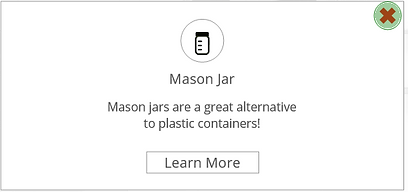
For example, the Mason Jar layer appeared when an the mason jar image was dropped onto the bag, with a short explanation of what type of household item it could replace with a button to Learn More. When the user selects the Learn More button, a trigger within the layer is used to direct them to a new slide with more detail on the sustainable item and links for purchasing.
By selected the red X icon for either the item pop-up box or on the product's individual slide, the user is returned to the base layer slide with reusable bag and products to continue playing. At any point, the user can select the exit icon, which used a trigger to launch a end-of-game slide.
The final project was published to the web and uploaded directly to Amazon Web Services (AWS) Cloud Computing. Uploading to AWS provided HTML coding that can then be embedded into a website.




The Impact and Reflection
This project demonstrates the value of incorporating interactive, game-based elements into learning by increasing engagement and motivation while reinforcing key concepts in a low-pressure environment. By moving beyond traditional assessment methods, the experience encourages active participation and supports deeper knowledge retention. The design decisions made throughout the project also highlight the importance of adaptability and creativity in developing effective learning solutions, ultimately contributing to more dynamic and learner-centered experiences that can be applied across a variety of contexts.
Creating this drag and drop game, though for a fictional client, provided me with further insight into how to create fun and interactive games for learning. The skills I obtained from developing this game can be applied to a wide range of learning experiences and is a great alternative to quizzes and traditional forms of testing knowledge. I was also able to apply different design skills with images by removing backgrounds and layering different images to create a cohesive picture. I learned when to it is more advantageous to use slides over layers, and vice versa, which took some trial and error and required openness to try new things.